Add Outlook Contacts & Create a Contact Group

Add a contact

  1. Choose People.Add a contact in Outlook
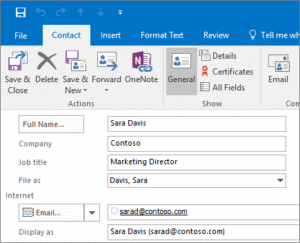
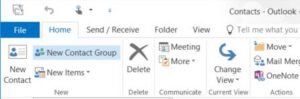
  2. Choose Home > New Contact or press Ctrl+N.
  3. Enter a name and any other information that you want to include for the contact.
  4. Choose Save & New if you want to create another contact or Save & Close if you are done.

Create a contact group 

If you often email a group of people, create a contact group in Outlook so you only need to email that contact group instead of individual emails.

  1. Open Outlook and click on the Contacts icon in the bottom left navigation pane. (It looks like the silhouette of two people
  2. Under the Contact Group tab, click Add Members and select From Outlook Contacts. the list below Address Book, and then select Contacts.Add a new contact group in outlook
  3. Hold down the CTRL key as you select each email contact you want to add to the Contact Group. the File menu, click New Entry.
  4. Click the Members button to add those specific contacts as your group members and click OK. Enter a name for the group. after checking that you’ve got all the names and emails you want for your contact group.
  5. Click Save & Close under the Contact Group tab.

Create a contact group in Outlook video

PDF Instructions: How to create contact groups in Outlook


Delaware Technical Community College is an equal opportunity employer and educational institution. Delaware Tech does not discriminate on the basis of race, color, creed, religion, sex (including pregnancy, childbirth, and related medical conditions, sexual orientation, and gender identity), national origin (including limited English proficiency), age, disability, marital status, veteran status, or political affiliation or belief, or, against any beneficiary of, applicant to, or participant in a state or federal financial assistance program or any other classifications protected by federal, state, and local law. Auxiliary aides and services are available upon request to individuals with disabilities. TTY: (800) 232-5470 delawarerelay.com. Reports of sexual misconduct and/or discrimination, involving any student or employee of Delaware Technical Community College should be directed to the Title IX/Civil Rights Coordinator, at civilrights@dtcc.edu, (302) 857-1903. Reports may also be mailed in writing to Delaware Technical Community College, P.O. Box 897, 100 Campus Drive, Dover, Delaware 19904. Learn more about Title IX/Civil Rights at the College and Equal Opportunity is the Law (PDF).

Digital AccessibilityPrivacy Policy

© 2026 Delaware Technical Community College

To top