Cybersecurity

See Yourself in CYBER!

Featured Content

MFA for Remote Access
MultiFactor Authentication iconAll employees are required to use MFA when remotely accessing the College’s network resources.
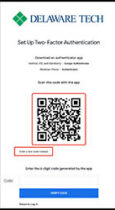
The MFA for web-based remote access (remote.dtcc.edu) application can use a few authenticator apps. It will display a QR code which can be registered in your app of choice. I would recommend MS Authenticator since it can already receive push notifications for logging into Outlook and Office 365 sites. Google Authenticator, Authy and other apps which can scan QR codes can be used. After the initial enrollment, you will see a field to submit the six-digit code from the app when logging in with your username and password.

Smartphone Screen: Web based remote access screen

Important: Microsoft Authenticator Notification
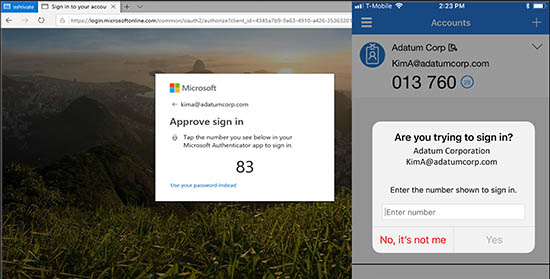
Microsoft Authenticator Phone-in Number approval

If you are using the Microsoft authenticator push notification for your multi factor authentication method you will be presented with a number on your screen to match the number on your phone.  This was done to increase the security of the multifactor authentication.  There have been several instances of MFA fatigue attacks, where bad actors are sending out multiple requests for access and these requests being accidently approved. By implementing number matching, users are prevented from accidentally approving MFA requests. The number will appear on the computer screen, and you will be required to enter the number into the authenticator app.  For more information, please check out Microsoft’s website link below:

Featured Content

Why do I have to use the Microsoft Authenticator App for Remote Access?

The Microsoft Authenticator app is required because the ability to put in a username and password is only available during login. During the login process, our authentication server creates a push notification that goes to the Authenticator app. There is no place to accept codes from alternative apps or text messages. The Microsoft Authenticator app is required because we are using Microsoft Azure to provide the MFA services.

Multi-Factor Authoring graphic

Other Cybersecurity Topics

Delaware Technical Community College is an equal opportunity employer and educational institution. Delaware Tech does not discriminate on the basis of race, color, creed, religion, sex (including pregnancy, childbirth, and related medical conditions, sexual orientation, and gender identity), national origin (including limited English proficiency), age, disability, marital status, veteran status, or political affiliation or belief, or, against any beneficiary of, applicant to, or participant in a state or federal financial assistance program or any other classifications protected by federal, state, and local law. Auxiliary aides and services are available upon request to individuals with disabilities. TTY: (800) 232-5470 delawarerelay.com. Reports of sexual misconduct and/or discrimination, involving any student or employee of Delaware Technical Community College should be directed to the Title IX/Civil Rights Coordinator, at civilrights@dtcc.edu, (302) 857-1903. Reports may also be mailed in writing to Delaware Technical Community College, P.O. Box 897, 100 Campus Drive, Dover, Delaware 19904. Learn more about Title IX/Civil Rights at the College and Equal Opportunity is the Law (PDF).

Digital AccessibilityPrivacy Policy

© 2026 Delaware Technical Community College

To top